Construction projects drown in fragmented files, version chaos, and miscommunication. A Common Data Environment (CDE) solves this by creating one digital hub for all BIM models, drawings, documents, and decisions. This guide covers what CDE is, why it’s essential for BIM Level 2+, key platforms, and implementation strategies.
What is a Common Data Environment?
A Common Data Environment (CDE) is a centralized digital platform that collects, manages, and distributes all project information, including BIM models, drawings, documents, contracts, and schedules. It was popularized as part of UK BIM Level 2 and is now fundamental to ISO 19650-compliant information management.
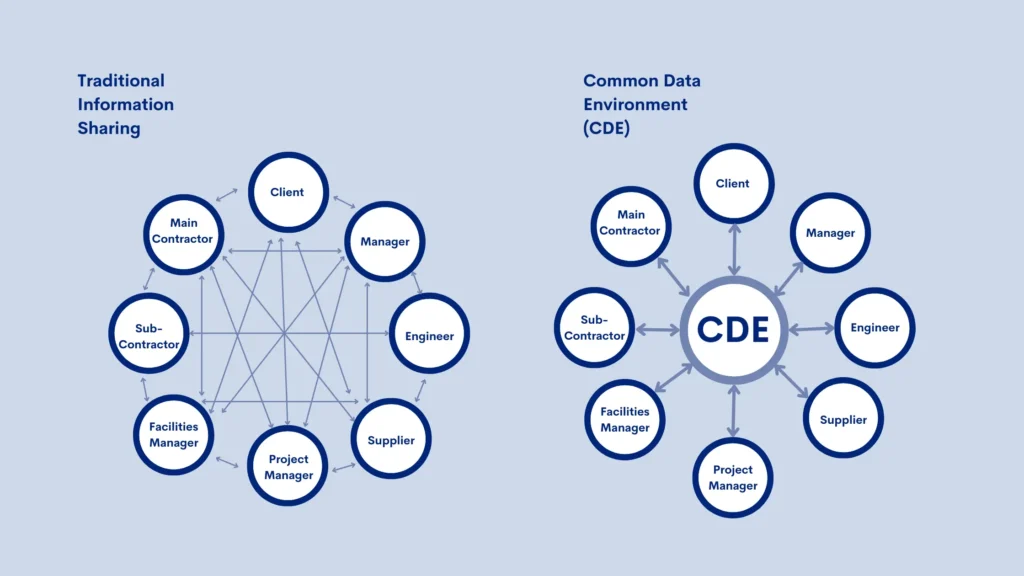
A CDE acts as the definitive single source of truth, ensuring all stakeholders work with accurate, up-to-date information instead of scattered files in emails and local folders.
Why is a Common Data Environment Important?
A CDE solves the chaos of fragmented project data by consolidating everything into one controlled environment with permissions, versioning, and audit trails. This significantly reduces errors caused by outdated documents, duplicated files, and miscommunication between teams.
For large, complex projects—such as high‑rise buildings, infrastructure, and industrial facilities—a CDE improves coordination, speeds up decision‑making, and strengthens data integrity and contractual compliance.
CDE vs Document Management System (DMS)
Both CDEs and DMSs manage documents, but they are not the same. A DMS focuses on document storage, retrieval, and lifecycle (workflows, version management, and logs) across an organization. A CDE, by contrast, is purpose‑built for project collaboration, combining document management with BIM model hosting, role‑based access, issue management, and project‑wide data coordination.
In practice, a CDE often includes or integrates DMS capabilities but adds BIM viewers, structured project workspaces, and collaboration tools tailored to construction and infrastructure projects.
Pro Tip: at AMC we use CDE to maximizes value with professional BIM Management — discover our BIM Management Services for seamless implementation and full ISO 19650 compliance.
How do BIM and the CDE fit together?
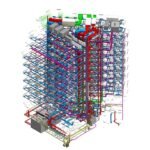
In a BIM workflow, the CDE is the central hub where all discipline models and related information are stored, coordinated, and shared. It typically hosts the federated BIM model, allowing architects, engineers, contractors, and owners to access, view, and comment on the latest design information in one place.
Because BIM relies on frequent data exchange and multi‑discipline collaboration, a robust CDE is now considered mandatory for serious BIM implementation. The CDE also supports processes like clash detection, model review, and 4D/5D BIM by keeping models and documents synchronized and traceable.
Key Features of a Common Data Environment
Typical core features of a CDE include:
- Centralized storage for models, drawings, documents, emails, and schedules
- Structured folder hierarchy aligned with project phases and disciplines
- Role-based permissions and access control for internal and external stakeholders
- Version control and audit trails for all files and revisions
- Integrated BIM model viewer (2D/3D) with markup and commenting tools
- Workflow automation for reviews, approvals, and transmittals
- Notifications and activity feeds to keep teams updated
- Secure access, encryption, and compliance features
These features ensure that information remains consistent, traceable, and accessible throughout the project.
5 Benefits of Using a CDE for Construction Projects
Using a CDE delivers clear advantages for project teams:
- Improved collaboration – All stakeholders access the same verified information, reducing misunderstandings and coordination gaps.
- Reduced errors and rework – Version control and real-time updates minimize mistakes caused by outdated files.
- Faster decision-making – Centralized, up‑to‑date data supports quicker approvals and more confident decisions.
- Better data integrity and security – Controlled access, audit trails, and central storage enhance trust in project data.
- Enhanced transparency and accountability – Documented workflows, logs, and histories make responsibilities and changes traceable.
Common Data Environment Applications and Platforms
Several platforms are widely used as CDEs in BIM-enabled construction projects:
- Autodesk Construction Cloud / BIM 360 – cloud CDE with strong BIM integration and ISO 19650 support
- Trimble Connect – model-based collaboration with clash and issue management
- Viewpoint, Asite, Procore, Deltek, ProjectWise – mature CDE/DMS-style solutions with advanced document control and BIM integration
- Revizto, Catenda, Thinkproject, and specialized CDE tools – focused on BIM collaboration, issue tracking, and model viewing
CDE “maturity” ranges from simple cloud storage (Level 1) up to fully integrated platforms with BIM, security, and lifecycle functionality (Level 2+).
Key Functions of a Common Data Environment
Beyond storage, a CDE supports several essential project functions:
- Information management across all stages (design, construction, handover, operations)
- Model hosting and federation for BIM coordination and review
- Issue tracking and markups linked directly to drawings or models
- Structured communication, meeting notes, and decision records
- Support for standards like ISO 19650 and national BIM mandates
These functions turn the CDE into the operational backbone of digital project delivery rather than just an archive.
What is the Future for BIM and the Common Data Environment?
common data environment are evolving from basic file repositories into integrated project information platforms that support the full asset lifecycle—from design and construction to operations and facility management. Trends include deeper BIM integration, richer metadata, automated workflows, and tighter alignment with ISO 19650 information management principles.
As more owners demand data-rich deliverables, CDEs will increasingly serve as long‑term asset information environments, supporting digital twins, predictive maintenance, and portfolio‑level analytics.
Overcoming Challenges in CDE Implementation
Common challenges include low user adoption, inconsistent naming and metadata, unclear responsibilities, and trying to use a CDE as “just a file server.” To overcome these, teams should:
- Define clear CDE standards and workflows in the BIM Execution Plan (BEP)
- Provide training and onboarding for all project participants
- Enforce consistent naming, classification, and versioning rules
- Start with pilot projects, refine processes, and scale up gradually
- Assign ownership (CDE manager / information manager) to maintain governance
When implemented with clear processes and leadership, a common data environment becomes a high‑value asset instead of extra overhead.
Conclusion
A Common Data Environment (CDE) streamlines construction collaboration by centralizing BIM models, documents, and decisions in a controlled platform. It reduces version conflicts, speeds coordination, and supports ISO 19650 compliance. Platforms like Autodesk Construction Cloud and Trimble Connect deliver ROI via less rework, faster decisions, and stronger accountability—key for complex projects in 2026+.