A Common Data Environment in bim is the agreed single source of project information — and, critically, it is a governed process rather than a folder. Under ISO 19650 every file becomes an information container carrying mandatory metadata, and moves through four defined states with an approval gate between each one. That structure is what determines who may rely on a drawing, what a contractor may build from, and whether the model you submit to an authority came from a controlled source or someone’s desktop. This guide covers the four states, the three gates, the metadata that makes it work, who hosts and owns the data, and what the CDE means for submission requirements in Saudi Arabia and the UAE.
- What a Common Data Environment is
- CDE solution vs CDE workflow
- A CDE is not cloud storage
- What an information container is
- The mandatory metadata
- The four states
- The three gates
- The workflow is not linear
- Client Shared: the fifth state
- Folder structure and practical setup
- Who hosts the CDE and who owns the data
- The CDE and Gulf authority submission
- The CDE for distributed teams
- Seven CDE failures
- Frequently asked questions
What Is a Common Data Environment in bim?
A Common Data Environment is the agreed source of information for a project or asset, used to collect, manage and distribute every piece of project information through a controlled process. That definition comes from ISO 19650-1, and every word in it is doing work — particularly agreed, single and controlled.
The practical version: it is the one place where project information lives, where every file carries structured metadata describing what it is and what it may be used for, where movement between states requires someone to approve it, and where an audit trail records what actually happened.
What it replaces is the default arrangement on most projects — drawings in inboxes, models on local drives, comments in messaging apps, and three people working from three different revisions. That fragmentation is the specific problem the standard exists to solve.
CDE Solution vs CDE Workflow
The single most useful distinction in this subject, and the one that resolves most arguments about whether a project “has a CDE”.
| CDE solution | CDE workflow | |
|---|---|---|
| What it is | The technology platform | The information process |
| Consists of | Software, storage, permissions, interface | Rules, states, transitions, revisions, approvals |
| Examples | Autodesk Construction Cloud, ProjectWise, Trimble Connect, Aconex and others | The four-state model defined in ISO 19650 |
| Can exist without the other? | Yes — and it is then just a document repository | Yes — but it will be painful to enforce manually |
A CDE is not a specific product. It is a normative concept, and any platform that genuinely enforces the workflow can serve as one. Equally, buying a well-known platform and using it as a shared drive does not give you a CDE — it gives you an expensive shared drive.
A CDE Is Not Cloud Storage
The most common misunderstanding, and the one worth settling in the first client meeting.
Cloud storage archives passively. It holds files and makes them retrievable. It does not know what a file is for, whether it has been checked, who approved it, or whether anyone is permitted to build from it.
A CDE governs actively. It manages information containers with metadata, states, verification and approval workflows, defined roles, traceability and an audit trail. The distinction is between storing and governing.
| Shared drive / cloud folder | ISO 19650 CDE | |
|---|---|---|
| Naming | Whatever the author typed | Validated against an agreed convention |
| Version control | “final_v3_REVISED_use-this-one” | Structured revision codes with history |
| Permitted use | Unknown — you have to ask someone | Stated by a status code on the container |
| Transitions | Drag and drop | Gated by approval and authorisation |
| Access | Folder-level, often too broad | Role-based, aligned to the state |
| Audit trail | Partial at best | Complete record of every transition |
| Answers “can I build from this?” | No | Yes |
Working on a project that needs a controlled information process?
AMC Engineer delivers coordinated LOD 300–500 BIM models across Architecture, Structure, MEP, Electrical, Infrastructure and Landscape — issued with status and revision through a controlled environment. Free LOD 200 sample from your own drawings in 24 hours.
What Is an Information Container?
ISO 19650 does not talk about files. It talks about information containers — the standardised translation of the concept of a file into the language of the standard.
An information container is a persistent, uniquely identified set of information carrying structured metadata: its status, its revision, its classification, the party responsible for it, its date, and its purpose. It might be a model, a drawing, a schedule, a report or a data set — the format is irrelevant. What makes it a container rather than a file is the metadata attached to it.
That shift in language matters practically. A file is something you open. A container is something the system can reason about — it can be validated, filtered, permission-controlled and audited, because the system knows what it is.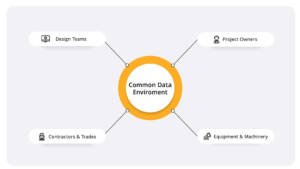
The Mandatory Metadata
ISO 19650 requires, as a minimum, four pieces of metadata on every information container.
| Metadata | What it does | Where it usually lives |
|---|---|---|
| Unique identifier | Identifies the container unambiguously across the whole project | The file name, structured as coded fields |
| Revision code | Distinguishes successive versions of the same container | File name and platform metadata |
| Status code | States the permitted use of the container at that point in time | File name and platform metadata |
| Classification code | Categorises the container within an agreed classification system | Platform metadata |
The status code deserves particular attention. ISO 19650-1 states in clause 12.1 that an information container should be assigned a status code as metadata to show the permitted use of that container. It is not a description of progress — it is a statement of what you are allowed to do with the information.
The Four States
Information moves through four defined states, and each one determines who can access, edit, approve or rely on the container.
Work in Progress (WIP)
Where information is created and amended by the task team responsible for producing it. Authors produce, control and check their own work here, and no other project team member can access or see the container while it remains in WIP.
This is the only state where the author has sole control. It is also where information should stay until it is genuinely fit to be seen — sharing half-finished work to demonstrate progress defeats the purpose of the state existing.
Shared
Information approved for sharing with other appropriate task teams — for comment, coordination or reference. Shared information can be relied on for coordination but not for construction. This is the state most coordination activity actually happens in: models federated, clashes tested, comments exchanged.
Published
Contractual information authorised by the appointing party for a specific use — typically for construction. Published is the state that carries commercial weight. When someone asks whether a drawing can be built from, they are asking whether it is published.
Archived
A journal of information providing an audit trail of container development, held in read-only form as a historical reference. Archived is not a bin. It is the record that lets you demonstrate, months later, what was issued, when, and in what state.
The Three Gates
Transitions between states are not drag and drop. Each one is gated, and the gates have distinct names because they are distinct acts performed by different parties.
| Transition | Gate | What it means |
|---|---|---|
| WIP → Shared | Approval | The task team confirms the container is fit to be seen and used by others for coordination |
| Shared → Published | Authorisation | The appointing party authorises the container for its stated contractual use |
| → Archived | Verification | The container is verified and locked as a read-only historical record |
The distinction between approval and authorisation is the one most often collapsed in practice. Approval is a production-side act: the people who made it say it is ready. Authorisation is a client-side act: the appointing party says it may be used contractually. A project where the same person does both has not implemented the workflow — it has implemented a folder structure with the workflow’s names on it.
The Workflow Is Not Linear
Diagrams of the four states make the process look like a conveyor belt. It is not.
Information moves back and forth between WIP and Shared repeatedly before anything is published. A model is shared, comments come back, it returns to WIP for revision, it is shared again. Each cycle produces a new revision and a new journal entry. Container development typically in
volves multiple iterations, multiple reviews, multiple approvals and multiple entries into the archive.
The coordination cycle that drives most of this back-and-forth is covered in our guide to BIM coordination, and the submittal review cycle that produces the same pattern for drawings is covered in our guide to shop drawings.
Two consequences follow that people find counter-intuitive:
- Not every container reaches Published. Some remain in WIP. Some are shared and then superseded by later revisions published in their place. Some are deleted before they are ever shared. That is normal.
- The audit trail matters more than the diagram. What is important is not that every container followed the ideal path, but that the record shows the path each one actually followed.
Client Shared: The Fifth State
ISO 19650 defines four states. In practice, many projects — particularly larger ones in this region — operate a distinct Client Shared state between Shared and Published.
The reason is structural. On a project with a master developer, an appointing party and one or more authorities, information often needs to be issued to the client for review before it is authorised for contractual use, and that review is a different act from inter-discipline coordination. Collapsing the two means either the client reviews things that were only meant for coordination, or coordination is delayed waiting for a client authorisation that was never needed at that stage.
If your project has multiple approval layers, define this state explicitly in the BIM Execution Plan, with its own permissions and its own status code. An undefined intermediate state becomes an email chain.
Folder Structure and Practical Setup
Most platforms implement the states as folders with role-based permissions. Three practical points make the difference between a structure that works and one people route around.
Number your folders
Folders in most platforms display in alphanumeric order by default, which puts Archived first and WIP last — the reverse of the workflow. Prefixing with numbers fixes it:
01-WIP 02-Shared 03-Published 04-Archived
Set permissions per state, not per project
WIP folders should be visible only to the task team that owns them. Shared should be visible across task teams. Published should be broadly readable but writable by almost nobody. Permissions set at project level rather than state level defeat the entire model.
Sub-divide by discipline inside each state
Separate WIP areas per discipline, so an architectural team’s work in progress is not visible to the structural team and vice versa. This is the arrangement that makes the WIP state mean something.
Setting up information management on a new project?
We work within your common data environment — naming, classification, status codes and coordinate systems agreed up front — and issue every model and drawing with status and revision applied.
Who Hosts the CDE and Who Owns the Data?
A question that arises on every project and appears in almost no guide to the subject.
Who hosts it
| Host | When it makes sense | Watch for |
|---|---|---|
| Appointing party (client) | Client has an established platform and wants continuity into operation | Supply chain may need training and licences; access must survive contract changes |
| Lead appointed party | Design or delivery lead runs coordination day to day | What happens at handover, and whether the client can access the archive afterwards |
| Main contractor | Construction-phase heavy projects | Design-phase information may sit elsewhere, creating two environments |
| Multiple CDEs | Common in reality — client, designer and contractor each have one | Define which is authoritative for what, and how information transfers between them |
What to settle in writing
- Which environment is authoritative when more than one exists, and for which information.
- Who pays for licences, storage and administration, and for how long.
- Who owns the data and the intellectual property in the models and drawings.
- What happens at the end — export format, handover of the archive, and how long access continues after practical completion.
- Access on termination — if an appointment ends early, how the outgoing party’s information is transferred and whether they retain a copy.
- Data residency and security, which matters on government, defence, utility and critical infrastructure projects.
The CDE and Gulf Authority Submission
In most international guidance the CDE is presented as an internal discipline — good practice that makes a project run better. In Saudi Arabia and the UAE it increasingly has an external consequence.
Abu Dhabi
Abu Dhabi Municipality publishes CAD and BIM submission requirements covering naming conventions, coordinate systems and file formats, with compliance requirements referencing ISO 19650. A separate model quality document addresses naming standards, model coordination and clash detection protocols.
The implication is direct: if naming conventions and ISO 19650 compliance are named in a submission requirement, then the mechanism that enforces them — the CDE — is no longer optional infrastructure. A file that reaches submission with a non-compliant name did not come from a controlled environment.
Dubai
Dubai Municipality has required the use of BIM on defined categories of project since 2013, and a circular issued in October 2023 introduced BIM model submission for new building permits with IFC as the format. The authority has publicly aligned with open standards including ISO 19650, IFC, IDS and BCF.
When the model itself is the permit submission, the question of which revision was submitted, in what state, and whether it was the authorised one becomes a compliance question rather than an administrative one.
Saudi Arabia
BIM requirements in the Kingdom are predominantly driven by client and programme, with large developers and giga-project programmes specifying information requirements and BIM Execution Plans contractually. Where those requirements reference ISO 19650 — as they commonly do — the CDE obligations come with them.
The Common Data Environment in bim for Distributed Teams
Most Gulf projects involve teams in different countries, and the CDE is the tool that makes asynchronous work possible rather than merely tolerable.
- Working weeks do not align. Saudi Arabia works Sunday to Thursday; UAE federal working moved to Monday to Friday in 2022; supporting teams elsewhere work different weeks again. The common working days between any two parties can be fewer than five.
- A file with a status needs no conversation. The whole value of a status code to a distributed team is that the recipient knows what they may do with the container without waiting for someone in another time zone to wake up and confirm.
- Decisions recorded in the CDE survive the time difference. A decision taken in a call and recorded nowhere is invisible to whoever was not on it.
- The audit trail replaces institutional memory. When teams change over a long project, the record is what carries continuity.
This is also why an email-based workaround is more damaging on a distributed project than a co-located one: a co-located team can correct a stale file by walking across the office. A distributed team loses a cycle.
Seven Common Data Environment in bim Failures
| Failure | What it causes | The fix |
|---|---|---|
| Platform bought, workflow never implemented | An expensive shared drive; no states, no gates, no audit trail | Configure the four states, the gates and role-based permissions before the first upload |
| Issuing outside the CDE | Files with no status circulating; someone builds from work in progress | Make the CDE the only issue route and apply it to everyone, client included |
| Approval and authorisation performed by the same person | The distinction between coordination-ready and contractually usable disappears | Assign the two gates to different parties as the standard intends |
| Naming convention agreed late | Retrofitting names across a completed container set, with no design value | Fix naming, classification and status codes in the BEP before production |
| Permissions set at project level | WIP visible to everyone; the state stops meaning anything | Permissions per state, sub-divided per discipline |
| Hosting and ownership undefined | A negotiation at handover about who keeps the archive | Settle hosting, payment, ownership and exit terms at appointment |
| Archive treated as a bin | No defensible record of what was issued and when | Verify and lock containers into the archive as a deliberate act |
Frequently Asked Questions about Common Data Environment in bim
What is a Common Data Environment in BIM?
A Common Data Environment is the agreed source of information for a project or asset, used to collect, manage and distribute every information container through a controlled process, as defined in ISO 19650-1. In practice it is the single place where project information lives, where every container carries structured metadata stating what it may be used for, and where movement between states requires approval.
What is the difference between a CDE and cloud storage?
Cloud storage archives passively — it holds files and makes them retrievable but knows nothing about their status, approval or permitted use. A CDE governs actively, managing information containers with metadata, defined states, approval workflows, role-based permissions, traceability and an audit trail. The difference is between storing and governing.
Is a CDE a specific software product?
No. A CDE is a normative concept, not a product. Any platform that genuinely enforces the workflow — states, gates, naming validation, version control, role-based permissions and audit trail — can serve as one. Equally, buying a well-known platform and using it as a shared drive does not produce a CDE.
What are the four states of the CDE workflow?
Work in Progress, where the task team creates and controls its own information and no one else can see it. Shared, where information is approved for other task teams to use for coordination and comment. Published, where information is authorised by the appointing party for contractual use such as construction. Archived, a read-only journal providing the audit trail of container development.
What is the difference between approval and authorisation?
Approval is the gate from Work in Progress to Shared: the task team confirms the container is fit for others to use in coordination. Authorisation is the gate from Shared to Published: the appointing party authorises it for its stated contractual use. Approval is a production-side act and authorisation is a client-side act, and collapsing them into one person defeats the workflow.
What is an information container?
The standardised translation of the concept of a file in ISO 19650 — a persistent, uniquely identified set of information carrying structured metadata including status, revision, classification, responsible party, date and purpose. It may be a model, drawing, schedule, report or data set; what makes it a container rather than a file is the metadata attached to it.
What metadata does ISO 19650 require?
As a minimum: a unique container identifier, usually set as the structured file name; a revision code; a status code; and a classification code. ISO 19650-1 clause 12.1 states that a status code should be assigned as metadata to show the permitted use of the container — so it describes what you may do with the information, not how far along it is.
What is a suitability code?
The term used for what ISO 19650 now calls a status code, in the superseded PAS 1192 series. They mean the same thing. Older project documents, templates and some platform configurations still use the earlier term, so if a specification and a platform use different vocabularies, resolve it in the BIM Execution Plan rather than running both.
Does every file have to reach the Published state?
No. Some containers remain in Work in Progress, some are shared and then superseded by later revisions published in their place, and some are deleted before they are ever shared. The workflow is not a one-way conveyor — information moves back and forth between WIP and Shared repeatedly. What matters is that the audit trail records the path each container actually followed.
Who should host the CDE?
It varies. The appointing party hosts where they have an established platform and want continuity into operation. The lead appointed party hosts where they run coordination day to day. The main contractor hosts on construction-heavy projects. In reality multiple environments often coexist, in which case the appointment must define which is authoritative for what, and how information transfers between them.
Who owns the data in a CDE?
That is a contractual question determined by the appointment documents and the BIM protocol, not by the platform’s settings. Settle ownership, intellectual property, who pays for licences and storage, export format at handover, how long access continues after completion, and what happens on early termination — all at appointment stage rather than at handover.
Does a CDE affect authority submission in the Gulf?
Increasingly, yes. Abu Dhabi Municipality publishes submission requirements covering naming conventions, coordinate systems and file formats with compliance referencing ISO 19650, plus model quality requirements addressing coordination and clash detection. Dubai Municipality introduced BIM model submission in IFC format for new building permits following a circular issued in October 2023. Where naming and ISO compliance are submission conditions, the CDE is the mechanism that enforces them.
Conclusion
The value of a Common Data Environment is not storage. It is the ability to answer one question instantly and defensibly: what am I allowed to do with this information? The status code answers it, the gates make it trustworthy, and the audit trail makes it provable months later.
Most CDE implementations fail in the same two ways. The platform is bought but the workflow is never configured, so it becomes an expensive shared drive. Or the workflow is configured but issuing outside it remains possible, so within weeks the single source is no longer single. Both are process failures, not technology ones.
In Saudi Arabia and the UAE there is a further reason to get it right. Naming conventions, ISO 19650 compliance and model quality now appear in authority submission requirements, and IFC model submission is a permit condition in Dubai. What reaches the reviewer has to come from somewhere controlled — which is exactly what the CDE is for.
Let’s get your information management right from the first upload.
AMC Engineer delivers federated LOD 300–500 BIM modelling, clash detection and construction documentation for contractors, consultants and developers across Saudi Arabia and the UAE — issued with status, revision and classification applied, ready for the review that matters.