Construction asset management covers two very different things, and confusing them wastes a lot of money. One is tracking movable equipment — excavators, generators, tools — across sites with GPS and barcodes. The other is managing information about the built asset itself: the chillers, panels, pumps and systems that stay in the building for thirty years. The first is solved by tracking software. The second is decided during design and construction, is far more valuable, and is where most organisations lose information they can never recover. This guide covers the second.
- Two kinds of asset management
- What asset information management is
- Where the requirements come from
- What data each asset type needs
- Asset tagging and the three-way alignment
- Classification systems
- COBie and structured handover
- LOD 500 and verified as-built
- Where information is lost at handover
- Connecting to CMMS, CAFM and ERP
- What this is worth in Gulf conditions
- Who owns the asset data
- Seven asset information failures
- Frequently asked questions
Two Kinds of Asset Management
Search for construction asset management and almost everything you find is about tracking movable equipment. That is a real problem with real solutions, and it is not what this guide is about.
| Equipment asset management | Built asset information management | |
|---|---|---|
| The asset | Excavators, generators, tools, vehicles | The building and its installed systems |
| Question answered | Where is it, who has it, when was it serviced? | What is it, what does it need, when does it fail? |
| Technology | GPS, RFID, barcodes, BLE tags | Model data, classification, structured handover, CMMS |
| Lifespan | Moves between projects | Stays in the building for decades |
| Decided by | Buying software | Decisions taken during design and construction |
| Recoverable if missed? | Yes — start tracking tomorrow | Only by surveying a finished building at significant cost |
That last row is the whole reason this deserves attention. Equipment tracking can start any time. Built asset information has a window — it exists during the project, in the hands of the people producing it, and it degrades from the moment they demobilise.
What Asset Information Management Is
Asset information management is the practice of defining, producing and maintaining the information an owner needs to operate, maintain and eventually replace a built asset. Under ISO 19650 it has a specific name: the Asset Information Model (AIM), which is what the Project Information Model becomes at handover.
The distinction matters:
- PIM — Project Information Model. Everything produced during design and delivery. Its purpose is to get the building built.
- AIM — Asset Information Model. What the owner operates from. Its purpose is to keep the building running.
They are not the same set of information, and that is the point most projects miss. The PIM contains a great deal the operator will never need — temporary works, superseded options, coordination history. The AIM needs things the project may never have produced — serial numbers, warranty expiry dates, maintenance intervals, spare part references. Handing over the PIM and calling it an AIM is the single most common failure in this whole subject.
Producing a handover model that an operator can actually use?
AMC Engineer delivers LOD 300–500 BIM models across Architecture, Structure, MEP, Electrical, Infrastructure and Landscape — classified, tagged and structured so asset information survives into operation. Free LOD 200 sample from your own drawings in 24 hours.
Where the Requirements Come From
Asset information requirements do not originate with the design team. They originate with the owner, and if the owner never states them, nobody produces them.
| Requirement | Question it answers | Set by |
|---|---|---|
| OIR — Organizational Information Requirements | What does the organisation need to know to run its business? | Owner |
| AIR — Asset Information Requirements | What information is needed to operate and maintain this asset? | Owner / operator |
| PIR — Project Information Requirements | What information is needed to deliver the project? | Owner |
| EIR — Exchange Information Requirements | What must each appointed party deliver, when, and how? | Appointing party |
The chain runs downward: the organisation’s needs define the asset’s needs, which define what the project must produce, which defines what each party delivers. Break the chain anywhere and the operator gets whatever the project happened to generate.
What Data Each Asset Type Needs
Not every element in a model is an asset. A wall is not an asset; a fire damper is. Deciding which elements are managed assets is the first practical step, and it prevents the two opposite failures — capturing nothing, or capturing everything and drowning the operator.
| Data field | Why the operator needs it |
|---|---|
| Asset tag / unique ID | The key that links model, physical equipment and maintenance record |
| Asset type and classification | Lets the operator query all assets of a kind across the portfolio |
| Location | Building, level, room or zone — how a technician finds it |
| Manufacturer and model | Basis for parts, manuals and replacement |
| Serial number | Warranty claims and recall traceability |
| Capacity and rating | Performance benchmark and replacement specification |
| Installation and commissioning dates | Age, warranty start, and the baseline performance reference |
| Warranty period and expiry | Whether a failure is chargeable or covered — often the fastest payback in the whole dataset |
| Maintenance interval and regime | Drives the planned maintenance schedule |
| Spare part references | Lead time and availability at the moment of failure |
| Responsible contractor | Who to call during the defects period |
| Documents | O&M manual, test certificate, approval reference |
Twelve fields. None of them are difficult. All of them are trivially available during construction and expensive to reconstruct afterwards.
Asset Tagging and the Three-Way Alignment
This is the single most important thing on the page.
An asset tag has to mean the same thing in three places:
- The model element — the parameter on the object in the BIM model.
- The physical equipment — the label a technician reads standing in front of it.
- The maintenance system — the record in the CMMS or CAFM.
If those three do not correspond exactly, none of the rest works. The operator cannot go from a work order to a location, from a location to a specification, or from a specification to a spare part. Every downstream capability — planned maintenance, warranty management, condition monitoring, digital twin — depends on this alignment and fails without it.
Practical requirements:
- Agree the tagging convention before installation begins, not during commissioning.
- Make it structured, so the tag itself encodes building, level, system and sequence rather than being an arbitrary number.
- Make it durable. A printed label in a plant room in this climate has a limited life; engraved or industrial-grade labelling survives.
- Assign responsibility explicitly — who applies the physical label, who populates the model parameter, who creates the CMMS record, and who checks all three match.
- Verify by sample at handover. Pick twenty assets, walk the building, and confirm the tag on the equipment matches the model and the CMMS. Failures found here are fixable; failures found in year two are not.
Classification Systems
Classification is what turns a model from a picture into a database. Without it, “show me all air handling units” cannot be answered programmatically.
| System | Origin | Common use |
|---|---|---|
| Uniclass | UK | Widely used on ISO 19650 projects and by UK-derived consultants, which includes many in the Gulf |
| OmniClass | North America | US-derived practice; multi-table structure |
| MasterFormat / UniFormat | North America | Specification and cost structuring |
| Client or developer system | Project-specific | Common on large developers and giga-project programmes, and usually binding where it exists |
Which system matters less than consistency. What causes real damage is a project where three consultants each used a different one, or where classification was applied to some elements and not others. Fix it in the BIM Execution Plan before production starts — our guide to BIM standards and ISO 19650 covers the framework.
COBie and Structured Handover
COBie — Construction Operations Building information exchange — is a structured format for delivering asset information. Rather than handing over a model plus a folder of PDFs, COBie delivers the asset data as a defined spreadsheet or exchange structure that a maintenance system can import.
Its value is not the format itself but what it forces. COBie has defined sheets for facilities, floors, spaces, types, components, systems, spares, resources and jobs. Populating it requires someone to decide, per asset, what it is, where it is, what type it belongs to and what it needs — which is exactly the discipline that produces usable asset information.
Two practical cautions:
- COBie is only as good as its population. A COBie file delivered with empty fields satisfies a contractual requirement and helps nobody. Specify which fields must be complete, not merely that COBie is required.
- Decide who populates it and when. Manufacturer and serial data comes from the installing contractor, not the designer, and it becomes available during construction. Populating COBie at handover from memory is how the empty-field version happens.
Alongside COBie, the model itself should be delivered in IFC as an open, durable format. An asset outlives software versions, and a model locked to a platform that may not exist in fifteen years is a liability rather than an archive.
Need asset data structured during the project, not reconstructed after it?
We build classification, asset parameters and structured data into the model as it is produced — alongside the coordination and documentation the project itself needs.
LOD 500 and Verified As-Built
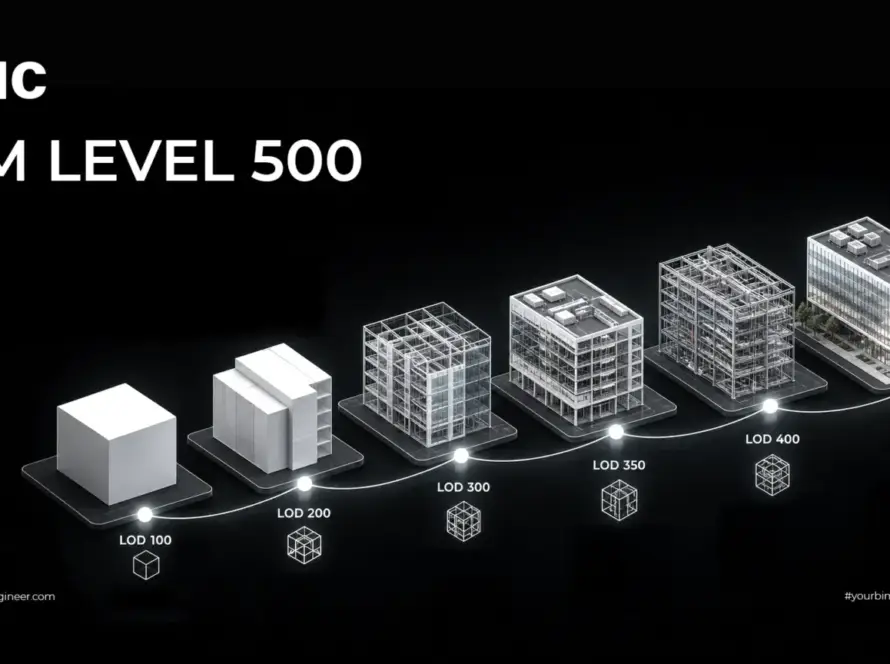
Level of development 500 is the point where an element is field-verified and carries operational data. It is often misread as “the most detailed level” — it is not. LOD 500 is defined by verification against reality rather than geometric richness. An LOD 500 element can be simpler than an LOD 400 one and still be more valuable, because it is true.
Two routes to it:
- Progressive verification during construction. The model is updated as work completes and substitutions are approved. More accurate, spreads the effort, and requires discipline throughout.
- Post-construction survey. Laser scanning the completed building and verifying or rebuilding the model against it. Our guide to LiDAR and scan to BIM covers this — including its central limitation: a scan cannot see services above ceilings or inside risers, which is precisely where the assets an operator cares about live.
That limitation is the argument for the first route. A post-completion scan captures geometry beautifully and captures concealed plant not at all. Our guide to BIM levels of development covers what each level includes.
Where Information Is Lost at Handover
BIM adoption has concentrated on design and construction, with limited integration into operations. That discontinuity causes substantial information loss at handover, and it is one of the persistent barriers to getting operational value from digital delivery.
The specific losses, in the order they usually occur:
- Substitutions never reflected. Equipment changed during procurement; the model still shows the specified item.
- Manufacturer data never captured. Serial numbers and warranty dates existed on delivery notes that went into a site file nobody kept.
- As-built not verified. The design model was relabelled rather than checked.
- Data delivered unstructured. Asset information arrives as a folder of PDFs, which is technically complete and practically unusable.
- Tags misaligned. The model, the labels and the CMMS use three different conventions.
- No import path. The data is structured but nobody mapped it into the operator’s system, so it sits unused.
- Nobody owns it. The project team demobilised and the operator inherited files without a custodian.
Connecting to CMMS, CAFM and ERP
Asset information has no value sitting in a model. It has value inside the systems the operator actually uses.
| System | What it does | What it needs from the project |
|---|---|---|
| CMMS Computerised Maintenance Management System |
Work orders, planned maintenance schedules, asset history | Asset register with tags, types, locations, maintenance intervals |
| CAFM Computer-Aided Facility Management |
Space management, occupancy, service delivery | Spatial data, room and zone identifiers, areas |
| ERP | Finance, procurement, capital planning | Asset values, expected life, replacement cost basis |
| BAS Building Automation System |
Live control and monitoring of building services | Point naming aligned to asset tags |
The integration question to settle early is simple: what format does the operator’s system import, and who does the mapping? Delivering a technically excellent dataset in a structure the CMMS cannot ingest produces the same outcome as delivering nothing. Ask the operator’s system administrator during design, not at handover.
Where this leads next, for owners who want operational data as well as records, is covered in our guide to digital twin technology in construction.
What This Is Worth in Gulf Conditions
Cooling plant dominates the asset register by value and by risk
Buildings in Saudi Arabia and the UAE carry cooling loads that temperate-climate buildings do not, which means larger and more numerous mechanical assets: chillers, air handling units, fan coil units, pumps, cooling towers or district cooling interfaces. That plant represents a large share of both capital value and operational risk, and it is the plant where a missing maintenance record turns into a failure in August.
Environmental conditions shorten intervals
Dust loading affects filtration and increases cleaning and replacement frequency. High ambient temperature affects equipment operating envelopes and duty cycles. Coastal salinity affects external plant, fixings and enclosures. Maintenance regimes derived from temperate-climate manufacturer defaults will be optimistic, and knowing the actual installed equipment and its commissioned baseline is what lets an operator adjust them on evidence rather than guesswork.
Long-hold ownership changes the calculation
Much of the region’s commercial stock is held long term by developers and institutional owners rather than sold at completion. Where the party commissioning the project is also the party operating it for decades, asset information is a direct investment rather than a cost transferred to someone else. Where the developer sells on, the calculation is different — and worth being honest about internally.
Fit-out cycles make verified records pay quickly
Commercial buildings here are let and re-let, and every tenant works package begins with someone trying to establish what is actually above the ceiling. A verified as-built model removes survey cost and design risk from every one of those packages — which is often the fastest and most defensible return on the whole exercise.
Model-based delivery is already normalising
Dubai Municipality has required the use of BIM on defined categories of project since 2013, and a circular issued in October 2023 introduced BIM model submission for new building permits in IFC format. Abu Dhabi Municipality publishes submission requirements covering naming conventions, coordinate systems and file formats referencing ISO 19650. Projects already producing classified, correctly named, IFC-exportable models are much closer to a usable asset information deliverable than those that are not.
Who Owns the Asset Data
A contractual question that surfaces at handover if it was not settled at appointment.
- Ownership and intellectual property in the model and the asset data.
- Where it is hosted after practical completion, and who pays for that hosting.
- What format it is delivered in, and whether the operator can open it without a licence they do not have.
- How long project team access continues during the defects liability period.
- Who maintains it as the building changes — because an asset register that is not updated is worse than none, since people trust it.
- Data security and residency, which matter on government, healthcare, utility and critical infrastructure assets.
Our guide to the common data environment covers hosting and ownership in more depth, including what happens to the archive when an appointment ends.
Seven Asset Information Failures
| Failure | What it causes | The fix |
|---|---|---|
| AIR never written | The project produces whatever it happens to generate; the operator gets none of what they needed | Ask the facilities team what they wish they had last time, and write it down |
| PIM handed over as the AIM | A model full of construction information and missing operational data | Define the AIM as a distinct deliverable with its own content requirements |
| Tags misaligned across model, equipment and CMMS | Nothing links; every downstream capability fails | Agree the convention before installation and verify by sample at handover |
| Asset data delivered as PDFs | Technically complete, practically unusable | Structured delivery in COBie or the operator’s import format |
| COBie delivered with empty fields | A contractual box ticked and nothing gained | Specify which fields must be populated and by whom |
| No import path agreed | Good data that never reaches the system it was for | Confirm the operator’s import format and mapping during design |
| No custodian after handover | The register decays and people keep trusting it | Name an owner and a maintenance process for the asset information itself |
Frequently Asked Questions
What is construction asset management?
The term covers two different things. One is tracking movable equipment such as excavators, generators and tools across sites using GPS, RFID or barcodes, solved by tracking software. The other is managing information about the built asset itself — the installed systems that stay in the building for decades — which is decided during design and construction and is far harder to recover if missed.
What is an Asset Information Model?
Under ISO 19650, the AIM is what the Project Information Model becomes at handover: the information an owner operates from. It is not the same set of information as the PIM. The PIM contains construction material the operator will never need, and the AIM needs data the project may never have produced — serial numbers, warranty expiry, maintenance intervals and spare part references.
What is the difference between PIM and AIM?
The Project Information Model exists to get the building built and covers design and delivery. The Asset Information Model exists to keep the building running and covers operation and maintenance. Handing over the PIM and calling it an AIM is the most common failure in this subject, because the two contain substantially different information.
Where do asset information requirements come from?
From the owner. Organizational Information Requirements state what the organisation needs to run its business, Asset Information Requirements state what is needed to operate and maintain the asset, Project Information Requirements state what the project must produce, and Exchange Information Requirements state what each appointed party delivers. If the owner never states them, nobody produces them.
What data should be captured for each asset?
Asset tag, type and classification, location, manufacturer and model, serial number, capacity and rating, installation and commissioning dates, warranty period and expiry, maintenance interval, spare part references, responsible contractor, and linked documents such as the O and M manual and test certificate. All twelve are readily available during construction and expensive to reconstruct afterwards.
Why does asset tagging matter so much?
Because a tag has to mean the same thing in three places: the model element parameter, the physical label on the equipment, and the record in the maintenance system. If those three do not correspond, the operator cannot go from a work order to a location, or from a location to a specification. Every downstream capability including planned maintenance, warranty management and any digital twin depends on that alignment.
What is COBie?
Construction Operations Building information exchange — a structured format for delivering asset information, with defined sheets for facilities, floors, spaces, types, components, systems, spares, resources and jobs. Its value is less the format than the discipline it forces: populating it requires deciding, per asset, what it is, where it is and what it needs.
Is COBie enough on its own?
Only if it is properly populated. A COBie file delivered with empty fields satisfies a contractual requirement and helps nobody, so specify which fields must be complete and who populates them. Manufacturer and serial data comes from the installing contractor during construction, not from the designer at handover. The model itself should also be delivered in IFC as an open, durable format.
What LOD is needed for asset information?
LOD 500, which is defined by field verification against reality rather than by geometric richness. An LOD 500 element can be geometrically simpler than an LOD 400 one and still be more valuable because it is true. Verification can be progressive during construction or through post-construction survey, though scanning cannot capture services concealed above ceilings or inside risers.
Why is information lost at handover?
Typically in this order: substitutions made during procurement were never reflected in the model; manufacturer and serial data was never captured; as-built status was assumed rather than verified; data was delivered as unstructured PDFs; tags were misaligned between model, labels and the maintenance system; no import path into the operator’s system was agreed; and no one was named as custodian after the project team demobilised.
How does asset data connect to a CMMS?
Through an agreed import format and a mapping between the delivered data structure and the system’s fields. The question to settle early is what format the operator’s system imports and who does the mapping — because a technically excellent dataset in a structure the CMMS cannot ingest produces the same outcome as delivering nothing. Ask the operator’s system administrator during design.
Why does this matter more in the Gulf?
Because cooling plant dominates the asset register by value and by operational risk, and it is the plant where a missing maintenance record becomes a failure in August. Dust, heat and coastal salinity also shorten maintenance intervals relative to manufacturer defaults, so knowing the actual installed equipment and its commissioned baseline is what lets an operator adjust on evidence. Long-hold ownership and frequent fit-out cycles both increase the return further.
Conclusion
Equipment tracking is a purchasing decision. Built asset information is a project decision, and it has an expiry date.
Everything an operator needs — what the equipment is, who made it, when it was commissioned, when the warranty ends, how often it needs servicing — exists during construction, in the hands of people who will move on. Capturing it then costs a fraction of reconstructing it later, and reconstructing it means opening ceilings in a completed building to find out what is above them.
The practical recommendation is unglamorous and short. Write the asset information requirements before the project starts. Agree the tagging convention before installation begins. Deliver structured data in an open format the operator’s system can actually import. Verify a sample at handover. Do that and the building has a usable record for as long as it stands.
Let’s build the asset record while the information still exists.
AMC Engineer delivers federated LOD 300–500 BIM modelling, clash detection and construction documentation for contractors, consultants and asset owners across Saudi Arabia and the UAE — classified, tagged and structured for the decades after handover.